
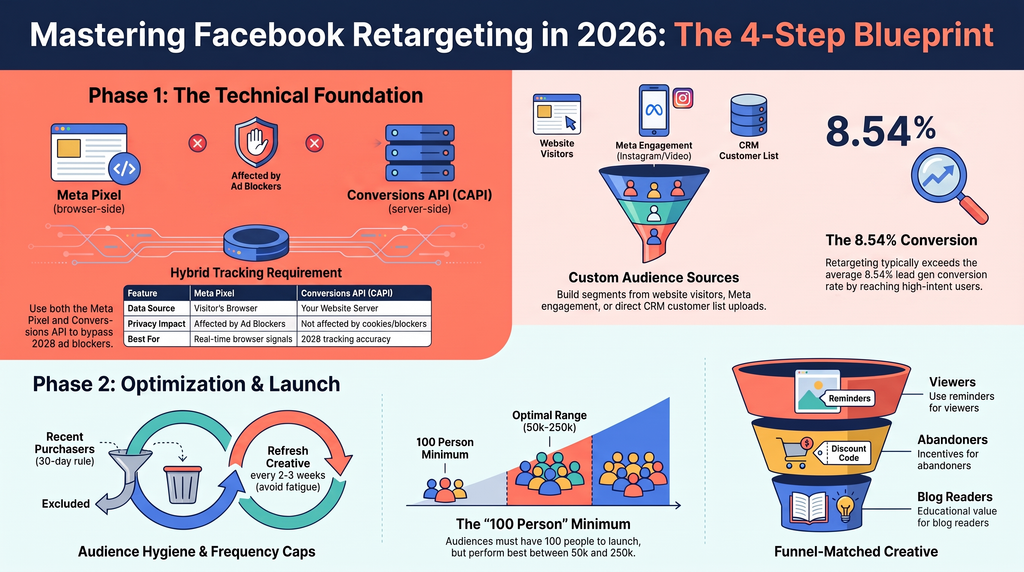
To create retargeting ads on Facebook, install the Meta Pixel and Conversions API on your website, build a Custom Audience from people who already visited your site or engaged with your Page inside Meta Ads Manager, then launch a campaign with creative matched to where each audience dropped off. This guide walks through that full setup step by step, checks whether retargeting still works in 2026, compares the Pixel against the Conversions API, and answers the questions people ask most before spending their ad budget. Read it through to the end before you launch anything, since the setup order matters more than any single step on its own.
What is Facebook retargeting?
Facebook retargeting is advertising shown specifically to people who already interacted with your business: visited your website, watched part of a video, opened your app, or engaged with your Page or Instagram account. Instead of introducing your brand to a stranger, it picks up a conversation that already started.
Meta’s own retargeting guide describes it as reconnecting with people who already know your business. The mechanism runs on three data sources: your website through the Pixel and Conversions API, your Meta properties like your Page or lead forms, and any customer list you upload directly.
That distinction is the whole point. A stranger needs an introduction. Someone who added a product to their cart three days ago needs a nudge, not a pitch.
Is Facebook retargeting still effective in 2026?
Yes, and the benchmark data backs that up rather than just the marketing copy around it. According to WordStream’s 2026 Facebook Ads Benchmarks report, the average conversion rate for lead generation campaigns sits at 8.54% across all industries. Retargeting segments tend to land above that average, since they reach people who already showed intent instead of cold traffic.
What actually changed isn’t whether retargeting works. It’s how much the Pixel alone can see. Browser privacy restrictions and ad blockers cut into that visibility, which is why the Conversions API below matters more now than it did five years ago.
If you’re not sure your current tracking is capturing this correctly, that’s usually the first thing worth checking before spending another rupiah on ads.
How to create retargeting ads on Facebook: a 4-step setup
Install the Meta Pixel and Conversions API
Start with tracking, not audiences. There’s no Custom Audience to build from data you never collected.
- Open Events Manager in Meta Business Suite and connect a data source for the web.
- Add the Meta Pixel base code to your site. Paste it directly into your site’s header, or use a platform integration through Shopify, WordPress, or Google Tag Manager. Gwenchana’s walkthrough of Facebook Pixel installation (Bahasa Indonesia) covers all four install methods and the errors that trip people up most.
- Verify the Pixel fires correctly on page views, add to cart events, and completed purchases before moving on.
- Set up the Conversions API alongside it. CAPI sends conversion events from your server straight to Meta, so a blocked cookie doesn’t leave a hole in your data. Twilio’s Conversions API integration guide covers the technical setup, and Gwenchana’s guide to Offline Conversions API (Bahasa Indonesia) covers the version built for tracking sales that happen in a physical store or over WhatsApp.
In practice, this step trips up more businesses than it should. A lot of sites have the Pixel installed and technically connected in settings without CAPI actually passing server side events, so half the tracking is missing and nobody notices until the numbers look off.
If you’re running a longer B2B sales cycle, Gwenchana’s guide to B2B retargeting ads goes deeper on configuring Pixel and CAPI together for accounts that don’t convert on the first visit.
Meta Pixel vs. Conversions API: which do you need?
| Meta Pixel | Conversions API | |
| Tracks from | The visitor’s browser | Your website’s server |
| Affected by ad blockers or cookie limits | Yes, partially | No |
| Setup effort | Low, one snippet | Moderate, needs server side or partner setup |
| Best for | Quick starts, small sites | Any business that needs 2026-era tracking accuracy |
Most businesses need both rather than one or the other. The Pixel is fast to install and gives real time browser signals. CAPI fills in what the Pixel misses.
Build a Custom Audience in Meta Ads Manager
With tracking live, open the Audiences tab in Ads Manager and select Create Audience, then Custom Audience. Choose your source:
- Website, pulling from your Pixel and CAPI data
- A Meta source, such as your Page, Instagram account, or video views
- A Customer list, uploaded from your CRM
For website audiences, you can target broadly (all visitors) or narrow it to people who viewed a specific product page, added to cart without buying, or spent longer than a set amount of time on a page. Set a lookback window, typically 30 to 180 days, based on how long your customers usually take to decide.
Meta recommends at least 100 people in a Custom Audience before targeting it. Campaigns generally deliver best once that audience sits between 50,000 and 250,000 people. Below that range, expect higher costs and slower delivery.
A Custom Audience is not the same tool as a Lookalike Audience:
| Custom Audience | Lookalike Audience | |
| Who it reaches | People who already interacted with you | New people who resemble your existing audience |
| Use case | Retargeting, warming up known visitors | Prospecting, finding cold strangers |
| Minimum size needed | 100 people | 100 people from a single country |
If you’re running on a modest daily budget, start with one or two audiences, such as cart abandoners and recent page visitors, rather than splitting into a dozen tiny segments from day one. Gwenchana’s guide to Meta Ads retargeting for B2B (Bahasa Indonesia) breaks down audience segmentation further for longer, more considered sales processes.
Exclude recent purchasers and set your retention window
Two adjustments separate a retargeting campaign that feels helpful from one that feels annoying:
- Exclude recent purchasers. Set a rule, usually a 30-day exclusion, so people who just bought stop seeing the ad that convinced them to buy. Nothing wastes budget faster than advertising a product to someone who already owns it.
- Cap your frequency. If the same person sees your ad fifteen times in a week, that’s fatigue, not persistence. It shows up as rising costs and falling click through rates. Refresh creative every two to three weeks and check frequency inside Ads Manager before it costs you.
Design retargeting creative and launch the campaign
Retargeting creative works differently from a cold audience ad, because the viewer already has context.
- Someone who viewed a product but didn’t buy responds to a direct reminder of that product, maybe the specific detail they lingered on.
- Someone who abandoned a cart responds to urgency or a small incentive, like free shipping or a short-term discount.
- Someone who only read a blog post or watched part of a video isn’t ready to buy. They need one more piece of value, not a hard sell.
In Ads Manager, click Create, choose a conversion focused objective like Sales or Leads, then apply the Custom Audience at the ad set level. Upload your creative (carousel, single image, or video) and set your daily budget. Budgets vary by business, but a common approach is to run new visitor and retargeting campaigns side by side, shifting more of the daily budget toward retargeting as it proves out its own return. HubSpot’s guide to retargeting campaigns has more examples of how messaging shifts by funnel stage.
That covers the full mechanism: pixel, audience, exclusions, creative. Mapping all four of those against your specific funnel is a different task than following the steps. That’s the exact gap a strategy session is built to close. Meta Ads for B2B covers when this setup performs best versus when a different platform makes more sense.
Should you run retargeting in-house or hire an agency?
Running retargeting well takes more than one person opening Ads Manager once a month. It needs:
- Someone setting strategy
- Someone building creative
- Someone handling the tracking
- Someone reading the results afterward
Those are four skill sets that often get squeezed into one hire. Gwenchana’s guide to in-house vs. agency Meta Ads management (Bahasa Indonesia) unpacks that tension directly. Building an internal team means covering salaries, benefits, and ramp-up time for all four roles. An agency spreads that same expertise across clients. Neither is automatically right. It depends on budget, how fast you need to move, and whether retargeting is one campaign among many or the core of your growth plan.
Ready to build your retargeting funnel?
Retargeting only works as well as the funnel behind it. The Pixel, the audience segments, the exclusions, the creative: all of it has to map back to how your specific customers move from first visit to purchase, and that path looks different for a skincare brand than it does for a B2B software company.
Whether you build this yourself with the steps above or bring in help, creating retargeting ads on Facebook only pays off when it’s built around a real strategy, not switched on and left alone. If you’d rather have that funnel mapped out by people who do this daily, book a free strategy session and we’ll walk through what retargeting should look like for your business specifically. Or explore our Digital Advertising Services to see how we handle the full setup end to end.