
Meta Ads attribution is how Meta decides which ad gets credit for a conversion. It rests on the attribution model and the attribution window you choose at ad set level: a 1-day or 7-day click window, a 1-day view window and a 1-day engagement window. A sale that closes on WhatsApp or offline only shows up in Ads Manager if your business sends it back through the Conversions API, and even then it still has to fall inside the window.
The question we hear most from B2B teams is simple: why does a sale that clearly started with an Instagram ad never appear in Ads Manager? The answer sits in two layers. The first is the attribution setting in Ads Manager, which decides what gets counted. The second is the data path from your sales team back to Meta, which decides what can be counted. This guide covers both, using the Meta documentation pages linked below. Meta changes these settings from time to time, so check the live pages before you build anything.
This article is specific to Meta Ads. If you want the general picture of attribution models across all channels, read our guide to B2B marketing attribution. For the wider Meta Ads playbook, see Meta Ads for B2B.
What Is Meta Ads Attribution?
Meta Ads attribution decides which actions count as results of an ad, and which ad receives the credit.
Meta Ads attribution is the set of rules Meta uses to connect an action, such as a purchase or a form submission, with the ad a person saw or clicked before that action. Without these rules, an ad report would only contain impressions and clicks.
Meta’s explanation of actions attributed to ads separates two kinds of action:
- Actions on the ad, such as impressions, link clicks and video views. These happen directly on the ad, so Meta records them without guessing.
- Actions off the ad, such as a purchase on your website or a form filled in on a landing page. These are linked to the ad only if they happen within a set number of days after the person saw or clicked it, following the attribution setting at ad set level.
A common example: a factory owner clicks your Instagram ad on Tuesday and fills in your website form on Thursday. As long as the click window covers Thursday, that lead is counted as a result of the ad. Your sales rep then follows up on WhatsApp, and the contract is paid three weeks later. That payment happens off the ad, off your website and outside the window. Meta cannot know about it unless you send the data. And even once you send it, a payment made three weeks after the click is still not credited to that click when the window is 7 days.
Attribution Models and Settings in Meta Ads Manager
In Ads Manager you choose two things at ad set level: an attribution model and, for the standard model, the time windows for clicks, views and engagement.
Meta’s page on attribution models and settings describes three attribution settings for the standard model for website and in-store conversions. Each has its own attribution window:
| Setting | What triggers it | Window | Example |
|---|---|---|---|
| Click-through | A click on an ad link | 1 or 7 days | A person clicks the ad button and fills in your form five days later. Counted only if the 7-day window is selected. |
| View-through | An ad impression without a click | 1 day | A person sees the ad, does not click, then opens your website and signs up within a day. |
| Engage-through | A click other than a link click, or a video watched for at least 5 seconds (97% if the video is shorter than 5 seconds) | 1 day | A person watches a video ad to the end without clicking, then fills in your form within a day. |
The combination often called 7-day click, 1-day view means a conversion is counted if it happens within 7 days of a link click or within 1 day of an impression. One change is worth knowing about: click-through now counts link clicks only, while other clicks moved to engage-through. Meta also notes that some accounts still use the older version while the change rolls out, so check which options actually appear in your own account. The page does not name one combination as the default, so write down the setting on every ad set before you read a report.
There are three attribution models:
| Model | How it counts | When it fits |
|---|---|---|
| Standard | Conversions inside the click, view and engagement windows you choose | You want a rule that is easy to explain to your team and comparable with older reports |
| Incremental | A machine learning model estimates whether the conversion happened because of the ad; optimisation and reporting use incremental conversions | You want ads optimised for conversions the ads actually drive, not ones that would have happened anyway |
| Custom | Attribution data from your own analytics tool, sent through the Conversions API or a partner | Sales campaigns with a Purchase event; Meta says the feature may not be available to every account |
Meta covers the last two in its pages on incremental attribution and custom attribution. You choose the model when you create the ad set. One point is often missed: results from different models cannot be compared directly in the campaign summary table. To see the difference, Meta offers a Compare attribution settings feature.
Why the Pixel and a 7-Day Window Are Not Enough for B2B Sales
The Pixel only sees what happens on your website, and the longest click window in the standard model is 7 days. A B2B sale that closes through WhatsApp, a meeting or a bank transfer falls outside both.
Take a typical B2B flow:
- A procurement manager clicks your ad and fills in the website form. The Pixel records a Lead event.
- Your sales team contacts them on WhatsApp, sends a quotation and negotiates for weeks.
- The contract is signed and payment arrives by bank transfer.
The Pixel stops at step one. Step three happens outside the browser and long after the click window has closed, so Ads Manager reports that the ad produced one lead, not one sale. You feel the effect in two places. The campaign gets judged on the number of forms, and the delivery system learns to find people who look like form fillers, not buyers.
This is not a broken Pixel. The Pixel is built to record events on a website. It is one part of the setup, and Meta’s own documentation describes it as working together with the Conversions API.
The gap has two parts, and each is closed differently. The first part, data that never passes through the browser, is closed by the Conversions API. The second part, the time gap, is handled by sending a lead stage that happens sooner, such as a qualified lead or a scheduled meeting. For instant forms, Conversion Leads evaluates the lead stage within 28 days of lead creation. Sales events that arrive later are still useful for audiences and for your own sales reporting.
The Conversions API: A Data Path from Your Server and CRM to Meta
The Conversions API sends events from your server, website platform, app or CRM directly to Meta, including events that never happen in a browser.
The Conversions API is a direct connection between your marketing data and Meta’s systems. According to Meta’s Conversions API page, the connection can carry website, app, offline and messaging events, and it is used alongside the Pixel to make the connection more reliable. Many integrations do not need a developer.
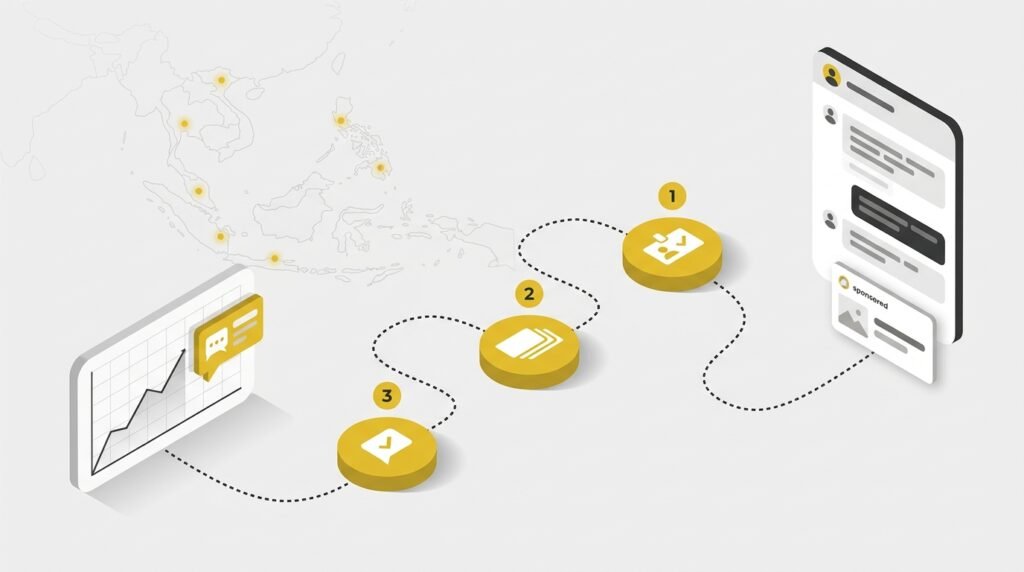
For a sale that happens offline, the flow looks like this:
- A person clicks your ad.
- The lead arrives with an email address or phone number and, where available, a click ID or lead ID from Meta. Store these identifiers from the very first lead.
- Your sales team updates the lead status, for example qualified, quotation sent or deal closed.
- Your system sends the event to a dataset in Events Manager, with contact data hashed.
- Meta matches the event to an account that saw or clicked the ad.
- The result appears in Ads Manager and can be used for optimisation and audiences.
The Pixel and the Conversions API Run Together, With Deduplication
The Conversions API does not replace the Pixel. You run both: the Pixel captures browser events, and the Conversions API sends server events, including those the browser cannot see. When both send the same event, for example a Lead from the same form, give both the same event ID and the same event name. Meta then counts it once, as described in the guide to deduplicating Pixel and server events. Skip this step and one lead can be recorded twice.
Offline Events Go to a Dataset, Not an Offline Event Set
Many older guides to Meta offline conversions recommend an offline event set. That route is closed: Meta states that the Offline Conversions API was discontinued in May 2025, and offline events are now sent to a dataset through the Conversions API. Per the offline events guide on Meta for Developers, offline and in-store events use action_source set to physical_store, contact data must be hashed, and transactions must be uploaded within 62 days of the conversion. Meta recommends sending in real time or daily.
What Data to Send, and How Meta Matches It
Meta matches server events to accounts using hashed customer data such as email, phone number, click ID and external ID (the customer ID in your own system). Hashing with SHA-256 turns the data into an unreadable string before it is sent, so what reaches Meta is not the original email address or phone number.
Event Match Quality is a score from 0 to 10 in Events Manager that rates how well the customer data in your server events can be matched to Meta accounts. According to Meta’s explanation of Event Match Quality, the score is based on the quality of the customer data and the percentage of events matched in the last 48 hours. Email and click ID are high priority; phone number and external ID are medium priority.
One requirement you cannot skip: the Meta Business Tools Terms require you to have a lawful right to the data you send and to hash it. Local data protection law also applies, so make sure your forms and privacy policy explain how the data is used.
Tracking Leads Through to a WhatsApp Close
A sale closed on WhatsApp can be sent back to Meta as long as the identifier from the ad is stored when the first lead arrives, and the route differs by lead source.
| Lead source | Identifier to store | Event to send back | Route to Meta |
|---|---|---|---|
| Click-to-WhatsApp ads | ctwa_clid and the WhatsApp Business account ID |
QualifiedLead, Purchase | Conversions API for Business Messaging (action_source = business_messaging) |
| Lead Ads (instant form) | Meta lead ID | Lead stage from the CRM | Conversions API for CRM, with the Conversion Leads goal |
| Website form | Email and phone number | Offline event | Conversions API to a dataset |
Roles should be clear from the start. We build the lead intake and tracking: ads, landing pages, spam filtering and the events needed for measurement. Follow-up and closing stay with your team, and the statuses they record are what gets sent back to Meta.
Click-to-WhatsApp Ads: Events from the Conversation
For ads that open a WhatsApp chat, the Conversions API for Business Messaging guide uses a dedicated click ID:
- A person clicks a click-to-WhatsApp ad and starts a chat.
- The first message carries
ctwa_clidin the referral data of the message webhook. Your chat system stores it with that conversation. - Your team qualifies the prospect and closes the sale in chat.
- The chat system sends a QualifiedLead or Purchase event through the Conversions API, with
action_sourceset tobusiness_messaging, thectwa_clidand the WhatsApp Business account ID.
There are limits. Meta’s guide is written for Business Messaging Partners, and ctwa_clid comes from the WhatsApp Business Platform webhook, so you need a system that receives chat data, not only an app on a sales rep’s phone. For chats without a ctwa_clid, for example ones that started before you stored the click ID, you can send hashed customer data plus a page_id. Matching through that route only covers ad interactions in the last 7 days and is not available in every country. Optimising for Purchase from chat also applies only to click-to-Messenger and click-to-WhatsApp ads.
Lead Ads Instant Forms: Conversion Leads from CRM Data
If leads arrive through an instant form on Facebook or Instagram, your CRM can send lead stages back to Meta. According to Meta’s Conversions API guide for CRM integrations, the Conversion Leads goal can produce higher-quality leads, with these conditions:
- instant forms only, not forms on a website;
- at least 200 leads per month;
- data uploaded at least once a day;
- the optimised stage happens within 28 days of lead creation;
- a conversion rate to that stage between 1% and 40%.
Store the Meta lead ID in your CRM for every lead. If your sales usually close well past 28 days, choose an earlier stage as the optimisation target, such as “meeting scheduled” or “quotation sent”.
Website Forms: Send Them as Offline Events
Leads from a website form do not carry a Meta lead ID. What you can use is the email address and phone number the prospect entered. When your sales team marks the lead as qualified or won, send the status as an offline event to the dataset, with hashed contact data and within the 62-day limit above. The more identifiers you send, the more events can be matched.
Identifiers not stored yet?
Let us tidy your tracking from ad to lead
We set up Meta Ads campaigns, landing pages, spam filters and tracking so each lead’s identifier is stored from the first chat or form. Tell us how your leads arrive and we will map the route with you.
Chat with us on WhatsApp Email usSetup Options: Partner Integration, Direct Server or WhatsApp Partner
How you send events to Meta depends on where your leads arrive and who holds the data. Four options are the most common.
| Option | Best for | Data to prepare | Who sets it up | Notes |
|---|---|---|---|---|
| Partner integration (website platform or CRM already connected to Meta) | Websites or CRMs with a Meta integration | Active Pixel, Events Manager access | Marketing team or website admin | Many integrations need no developer |
| Direct Conversions API from your server | Your own sales system, offline events | Stored identifiers, lead status, dataset | Developer | Full control over events and send timing |
| Business messaging partner for WhatsApp | Click-to-WhatsApp ads | ctwa_clid per chat, WhatsApp Business account |
Partner connected to the WhatsApp Business Platform | Sends QualifiedLead or Purchase from chat |
| Conversion Leads for instant forms | Lead Ads with qualifying volume | Lead ID in CRM, lead stage definitions | CRM owner or integration | Meta’s volume and timing conditions apply |
For website events, the Conversions API documentation on Meta for Developers mentions one-click setup from Events Manager when the Pixel is already installed, with no code. Offline and WhatsApp events still need a system that stores identifiers and lead status.
The hardest part is usually not the code. It is two things that sound minor: agreeing with sales on what “qualified” means, and making sure the identifier is stored from day one. An identifier that was not stored cannot be recovered later.
Reading Results: From Cost per Lead to Cost per Qualified Lead
Once lead stages and sales reach Meta, the most useful measure is no longer cost per lead but cost per qualified lead.
Cost per qualified lead (CPQL) is total ad spend divided by the number of leads your sales team judges qualified. The difference from cost per lead (CPL) is the denominator: CPL counts every form, CPQL counts only leads sales rate as a fit.
Picture two ads. Ad A brings many leads at a low cost each; Ad B brings fewer, each costing more. On CPL alone, Ad A wins. If sales data shows that nearly every lead from Ad B reaches the quotation stage while leads from Ad A rarely answer their chats, the decision flips. Without offline data, the most useful ad may be the first one you switch off.
Results can also improve once this data flows, through three mechanisms:
- Optimising toward a deeper event. A campaign that learns from QualifiedLead or a CRM stage looks for people who resemble buyers. Meta says Conversion Leads can produce higher-quality leads.
- Audiences from offline events. Offline events can feed custom audiences and lookalikes. We cover how to use those audiences for follow-up ads in B2B retargeting ads.
- Better matching. Meta says the Conversions API used together with the Pixel helps reduce cost per result, and a better Event Match Quality can lower cost per action.
The key word is “can”, not “will”. Results still depend on data volume, identifier quality and ad creative. To translate the numbers into profit, see how to measure the ROI of digital marketing. To compare Meta with another channel, read Google Ads vs Meta Ads for B2B ROI.
A Meta Ads Attribution Audit Checklist
A useful audit checks the settings in Ads Manager first, then the data path from lead to sale.
- Record the attribution model and settings on every ad set, and do not compare results across models in the same table.
- Confirm that the Pixel and the Conversions API are both active, and that events sent by both are deduplicated with event ID and event name.
- Check the Event Match Quality score in Events Manager for each key event.
- Confirm identifiers are stored when the lead arrives: lead ID for instant forms,
ctwa_clidfor click-to-WhatsApp, email and phone number for website forms. - Agree the lead stages with sales, for example qualified, quotation and deal, with a written definition of each.
- Send events daily, and send offline events within 62 days of the conversion.
- Compare Meta’s numbers with your own sales data, and then with other channels.
Summary: Two Layers to Get Right
Meta Ads attribution you can trust needs two layers. First, choose the model and window deliberately on every ad set, and read reports according to that choice. Second, send lead stages and sales that happen on WhatsApp, in meetings or by transfer back to Meta through the Conversions API, with identifiers stored from the first lead. Without the second layer, the ad that produces your biggest B2B sale can look like an ad that only produces forms.
Meta Ads tracking review
See where your sales drop out of ad reports
We review your attribution settings, Pixel and lead flow from ad to sale, then set up campaigns and tracking through our Digital Advertising Services.
Chat with us on WhatsApp Email us