

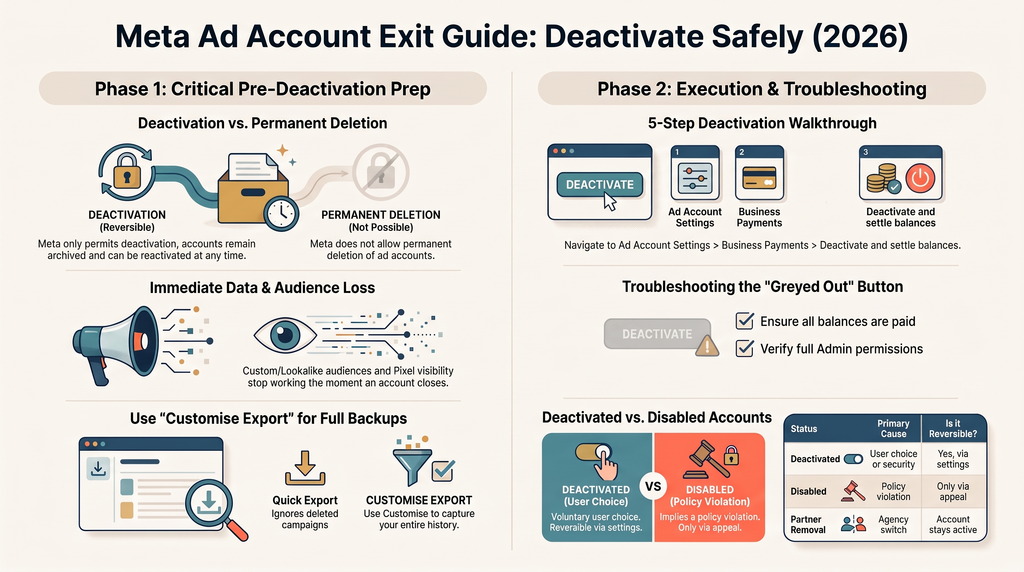
You can’t permanently delete a Facebook ad account. Meta only lets you deactivate one, through Ads Manager’s Ad account settings, after any outstanding balance is cleared. Contrary to what some AI answers currently claim, a closed account can be reactivated at any time, except one closed over a currency or timezone change.
This guide walks through the whole process: the real difference between deleting and deactivating, what you stand to lose in audiences and tracking data before you even click anything, the export step most guides skip, and the exact walkthrough for closing the account safely. Stick with it through the FAQ at the end, since the most expensive mistakes here happen before the deactivation screen, not during it.
Delete vs deactivate: what Facebook actually lets you do
Search “delete Facebook ad account” and most guides use “delete” and “deactivate” as if they’re the same button. They aren’t. Meta’s own Ads Manager documentation describes only one action here: deactivation. There’s no separate “permanent delete” feature hiding somewhere in Business Settings.
| Action | What happens | Reversible? | Data retained |
| Deactivate | Ads stop, payment methods removed, account closes | Yes, any time, except currency/timezone closures | Campaigns, audiences, and history stay archived |
| “Permanently delete” | Not a real option for ad accounts | n/a | n/a |
That settles the terminology. The more useful question is what’s actually at risk once you deactivate.
Not the same thing: deleting an ad, an ad ID, or ads tied to your payment method
Three related searches get mixed up with this one, and each points to a different setting.
- An individual ad, ad set, or campaign is a smaller unit inside the account. Deleting one from Ads Manager doesn’t touch the account itself. Everything else keeps running. Meta’s own glossary defines an ad account as campaigns, ads, and billing information only, nothing broader.
- An ad ID is the numeric identifier Facebook assigns to a specific ad for reporting and API calls. It disappears when the ad it belongs to is deleted, not on its own.
- “Deleting ads from your payment” usually means removing a card, not an ad. That’s a billing change inside Meta Business Suite, separate from anything covered here.
Before you deactivate: what you could permanently lose
The account survives. Plenty of what’s inside it doesn’t, and deactivation won’t warn you about most of it.
Custom and lookalike audiences
Custom Audiences and Lookalike Audiences built from pixel events, customer lists, or engagement data stop being usable once the account that owns them closes. If you’ve shared any with other ad accounts (a common setup when retargeting runs across multiple clients), those accounts lose access too. Meta tightened shared-audience rules in 2018 specifically to enforce this. Rebuilding a lookalike from scratch can take weeks of fresh data collection, and this guide to creating retargeting ads on Facebook covers how to rebuild those audiences on a new account.
Meta Pixel and Conversions API data
Meta doesn’t publish a fixed retention window for Meta Pixel or Conversions API data anywhere in its own documentation, so treat any specific day-count you read elsewhere with skepticism. What’s certain: once the account closes, you lose the ability to view or export that history through Ads Manager. If getting the tracking setup right was painful the first time, it’s worth having it documented before you need to rebuild it.
Lead data
Lead ads store submitted form data on their own expiration clock, independent of whether you deactivate anything. Export it the moment closing the account becomes a real possibility, not after.
If tracking all three of these feels like more than a settings change should demand, that’s usually where a second set of eyes catches what a one-time export misses. Talking to someone about protecting your audience and lead data first costs nothing and takes about fifteen minutes.
How to export your campaign data first (including already-deleted campaigns)
Most guides say “export your data” and stop there. The default export button doesn’t actually do that completely.
Click Export in Ads Manager’s reporting table, and Meta ships a quick .csv with summary totals, but it explicitly excludes deleted campaign data. Any campaign you ran and deleted before deciding to close the account won’t be in that file.
| Export type | Includes deleted campaigns? | Format options |
| Quick export | No | .csv only |
| Customise export | Yes, if selected | .csv or .xlsx |
To get everything, open the Export dropdown, choose Customise export, and select the option to include deleted campaign data before naming and downloading the report. Meta’s own export documentation confirms this is the only path that captures full history.
A CSV is only useful once someone reads it. Turning raw exports into something you can act on is a separate skill from the export itself, and knowing what’s worth tracking once you have the file matters just as much as getting it.
How to deactivate a Facebook ad account (step-by-step)
This is the actual procedure, on desktop. Deactivation isn’t available on mobile.
- Go to Ad account settings in Meta Ads Manager. You may need to re-enter your password.
- Scroll to the Business payments section. If it’s missing, you don’t have full control of the account.
- Click Deactivate ad account.
- Confirm on the screen that appears, and add a reason if you want. Any outstanding balance is charged to your payment method here.
- Click Deactivate ad account again to finish. Every active ad stops immediately.
That matches Meta’s official guide as written today. Meta updates Ads Manager’s layout more often than it updates its own help articles, so a screen that looks slightly different from this list isn’t a sign you’re doing it wrong.
Why the deactivate button might be greyed out
Three things cause this, and an unpaid balance is by far the most common.
- Outstanding balance: even a few cents blocks deactivation. Check Billing & payments, pay what’s owed, and try again.
- Missing permissions: only a full admin can deactivate an account. Analyst or Advertiser roles won’t see the option at all.
- Account ownership: if you only have access rather than owning the account inside your Business Portfolio, the owner has to act.
If the balance is paid and it’s still stuck, Meta’s own guide gives a two-working-day window before contacting support makes sense. The same logic applies if an ad simply won’t deliver instead of the account outright refusing to close. Check permissions and balance before assuming something’s broken.
Disabled vs deactivated: know which one you’re actually dealing with
A deactivated account and a disabled one need different fixes.
| Deactivated | Disabled | |
| Who does it | You, or Meta automatically for security | Meta, for a policy violation |
| Reversible? | Yes, any time, no deadline | Only through an appeal, no guarantee |
| How to tell | Ads Manager banner shows “Reactivate account” | Banner shows an advertising restrictions message |
The fix for a disabled account isn’t a settings toggle. It requires an appeal through Meta’s troubleshooting process. Meta’s documentation states this distinction directly, which matters because at least one major AI search assistant currently gets it wrong. Bing’s Copilot answer for this exact query claims a deactivated account “cannot be recovered,” then contradicts itself two sentences later about reactivating through support. It’s wrong. Deactivation is reversible by design.
Removing just your agency’s access (without closing the whole account)
Switching agencies is one of the most common reasons people land on this search, and closing the entire account is usually the wrong move for that situation. Revoking one partner’s access is smaller and faster.
- Go to Settings in Meta Business Suite for your business portfolio.
- Click Partners in the left menu. If it’s missing, you don’t have full control of the portfolio.
- Click Options next to the agency’s name, then Remove from business portfolio.
- Click Remove partner to confirm.
This path, confirmed in Meta’s current guide, leaves campaigns, audiences, and history untouched. Only that one agency’s access changes. Before handing the account to whoever’s next, knowing what separates a good handoff from a bad one matters more than the deactivation screen ever will. Most of the damage in an agency switch happens in the first two weeks, not at account settings.
Should you delete the account, or is it time to rethink your ad strategy?
Most people searching “delete Facebook ad account” aren’t shutting down advertising for good. They’re switching agencies, cleaning up a messy setup, or reacting to an account that stopped performing and assuming the account itself is the problem.
Sometimes it is. More often, the approach running through it isn’t working: wrong audiences, no retargeting layer, creative that was never built for the platform it’s running on. A B2B advertising plan built to survive an account reset looks nothing like one that has to be rebuilt from zero every time something changes.
If the honest answer is “I don’t know which one this is,” a free consultation is faster than guessing through another deactivation. Gwenchana runs managed advertising campaigns across Meta, Google, and TikTok for B2B and consumer brands in Indonesia. This exact audit is usually the first call, before any budget conversation happens.
Before you close anything
Deactivating a Facebook ad account takes five minutes. Rebuilding the audiences, tracking, and history you didn’t realize you’d lose takes considerably longer.
If you’re trying to delete a Facebook ad account because you’re switching agencies, changing strategy, or cleaning up a setup that got messy over time, book a free consultation before touching anything. It costs nothing to have someone check what’s worth saving first.
Related reading: social media management, SEO services, or the full services overview.